


Aximote: Car Data
Aximote
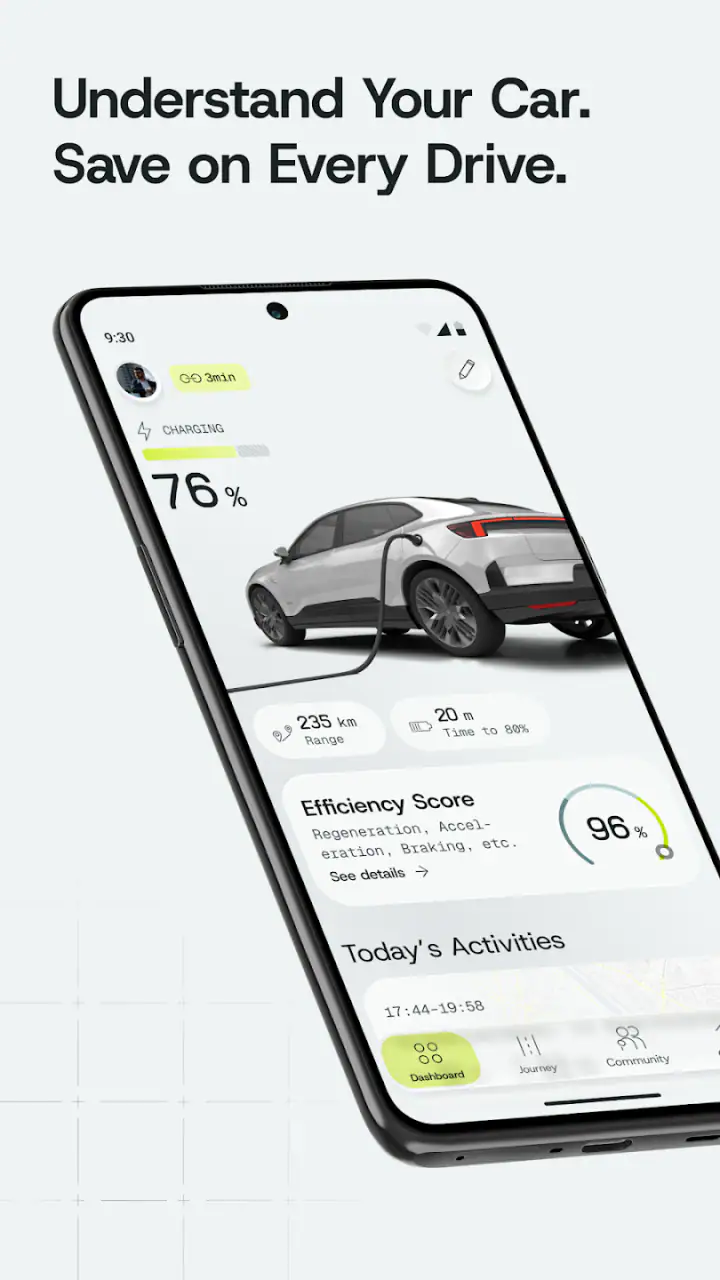
I came away from Aximote: Car Data with the impression that it is most useful when treated as a quiet record-keeping tool rather than a flashy driving companion. It is an Android app from Aximote in the Auto & Vehicles category, built around one practical idea: bring car costs, charging, fuel, trips, and driving insights into one place. That focus makes sense for anyone who wants to understand where their vehicle budget is going without maintaining a spreadsheet.
My overall view is positive, but with an important qualification. The app is valuable only if I use it consistently and enter information carefully. It does not magically discover the financial reality of owning a car. Its usefulness grows from the history I build inside it. For a driver willing to log refuelling, charging, journeys, and related costs, that history can become much more revealing than a vague feeling that the car is “expensive.”
What stood out during everyday use
The strongest part of the concept is the combination of several kinds of vehicle information. Fuel tracking on its own is common, and trip notes on their own are easy to find elsewhere. Putting running costs, energy use, journeys, and driving observations together creates a more complete picture of ownership. I can look beyond the price of a single visit to a petrol station or charging point and think about how those expenses connect with the way I actually drive.
That matters because car spending is often fragmented. One payment appears in a banking app, another is remembered from a receipt, and a long trip may merge into a general monthly impression. A dedicated log gives those events a clear home. In my experience, the real benefit is not entering one isolated expense; it is noticing patterns after several entries have accumulated.
A useful routine would be to record a fuel stop or charging session immediately after it happens, then add the trip while the route and purpose are still fresh. I would also keep the wording of trip notes consistent. For example, separating commuting, errands, family visits, and leisure driving makes later comparisons more meaningful than entering every journey under a vague label such as “personal.” This is one of the less obvious ways to get more value from a tracking app: the quality of the categories determines the quality of the conclusions.
Related News

Why WhatsApp Messenger Still Makes Everyday Communication Feel Easy

Jurassic World: The Game Is the Better Dino Tycoon for Strategic Players

Threads in Real Life: Who Should Join, Lurk, or Leave

How SHEIN Turned Shopping Into an Endless Content Feed

How to Make Fortnite Feel Smarter on Mobile

Should You Switch to Microsoft Outlook on Mobile?
The app’s emphasis on driving insights also gives the record a purpose beyond accounting. Costs can be viewed in context. A high-energy week may make sense if it included a long-distance journey, while a costly period with mostly short trips could suggest a different pattern. I would not treat an insight as a definitive diagnosis of the car or the driver, but it can be a useful prompt to investigate.
Another strength is that the idea works for more than one type of driver. Someone with a conventional fuel car can focus on refuelling and mileage patterns. Someone who charges a vehicle can use the same general approach for energy expenses and journeys. A household with more than one car may also find a central record easier than keeping unrelated notes in different places, provided the app’s setup allows the vehicles and events to be distinguished clearly in the user’s workflow.
The app is free to install, which lowers the barrier to trying it. Its content rating is Everyone, so it is presented as a general-purpose vehicle utility rather than something aimed at a narrow age group. Aximote is still a relatively small presence compared with the biggest automotive platforms: the app has passed ten thousand installs and holds a 4.8 average from roughly three hundred sixty ratings. Those figures suggest encouraging early reception, while also reminding me that this is not the same as choosing a universally established service with a huge user community.
Gallery
Turning records into decisions
The most useful workflow I can recommend is to begin with a baseline instead of attempting to reconstruct every past journey. Start on the day the app becomes part of the routine, enter the current vehicle details that the app asks for, and then log each relevant event from that point. After a few weeks, review the pattern rather than reacting to a single expensive entry.
This approach avoids a common mistake: spending a long evening trying to create a perfect historical record, then abandoning the habit because it feels like administrative work. A smaller, accurate recent history is more useful than a large collection of guesses. If older receipts are available, I would add only entries whose date, amount, and vehicle context are reliable.
There is also a practical distinction between cost tracking and cost forecasting. The app can help me understand what has happened, but I would not use a short run of records to promise what the next month will cost. Seasonal travel, changing fuel prices, unusual repairs, and different driving routines can all distort a simple average. The sensible use is to identify a range and a trend, not to treat the result as a guaranteed budget.
For drivers who share a car, consistency becomes even more important. If one person logs charging but another records only long journeys, the resulting picture will be incomplete. I would agree on a simple household rule: record every refuelling or charging event, and decide whether trips are logged by everyone or only when they serve a specific purpose. A shared habit can turn the app into a useful household reference; inconsistent input can make its insights misleading.
Where the experience needs patience
The central weakness is the unavoidable effort of manual tracking. A car data app depends on the driver remembering to enter information. That friction is easy to underestimate before using it. Missing one event may not matter, but missing several refuelling stops or charging sessions can make later comparisons unreliable. If I already dislike logging expenses, this app will not remove that resistance simply because the subject is a vehicle.
There is a second kind of friction: deciding what counts as a useful entry. A trip can be recorded as a distance, a purpose, or part of a larger journey, and different choices may produce different insights. I would prefer a clearly defined personal method and stick to it. Without that discipline, the history may look detailed while still being difficult to interpret.
I also would not confuse this tool with a full vehicle maintenance platform, a navigation service, or a replacement for a manufacturer’s charging application. Its appeal lies in bringing ownership information together, not in becoming every automotive tool at once. If my priority is live traffic, route guidance, workshop scheduling, fault diagnosis, or automatic vehicle telemetry, I would look at a more specialised alternative instead.
The in-app purchase range is another point to consider before committing to the app as a long-term system. Optional items range from $4.99 to $244.99 each, so the free entry point does not mean every possible part of the experience has the same cost. I would inspect what an optional purchase unlocks and whether it matches my actual habit before paying. For a casual driver who only wants occasional notes, a paid expansion may not be worthwhile. For someone building a serious long-term record, the value depends on how much time or clarity that purchase adds.
Because the app was released on April 25, 2025, I would also approach it as a young product rather than assuming it has the maturity of a long-established automotive suite. That is not a criticism of the developer by itself; newer apps can be cleaner and more focused. It simply means I would pay attention to how comfortably the app fits my routine and whether its current tools cover the records I personally care about.
A realistic month with the app
Imagine a driver who commutes during the week, charges at home when possible, and makes one longer family journey on a weekend. In the first week, the driver logs the energy event, the commute pattern, and the weekend trip. In the second week, a fuel purchase for another vehicle or an unexpected change in routine adds a useful comparison. By the end of the month, the driver can distinguish regular commuting from exceptional travel instead of seeing one combined total.
The practical question then becomes more specific: did the long journey dominate the month, or did repeated short drives create most of the activity? That is a better question than simply asking whether the car “used a lot.” It can influence decisions such as combining errands, reconsidering unnecessary short trips, or setting a more realistic amount aside for vehicle running costs.
There is a trade-off here. More detailed logging can produce more useful insights, but it also increases the chance that the habit becomes burdensome. I would begin with the minimum information needed to answer my main question. If I want to understand energy spending, I would prioritise charging and fuel events. If I want to understand time on the road, I would make trip logging the centre of the routine. Trying to capture everything from the first day is likely to reduce consistency.
Who should choose it, and who should skip it
I think this app is a good fit for drivers who want a clearer view of ownership costs and are comfortable with a small amount of regular input. It is especially appealing to people who alternate between different energy sources, track business or personal travel, or simply want to replace scattered notes with one vehicle-focused record. It may also suit a careful buyer who wants to observe running costs after purchasing a car rather than relying on a manufacturer’s general efficiency estimate.
It is less suitable for someone seeking automatic, effortless tracking. If I expect the app to identify every journey, expense, and vehicle event without my involvement, I would probably become frustrated. It is also not the best choice for a driver whose main requirement is navigation, roadside assistance, maintenance reminders, or direct integration with a specific vehicle system. A banking app may be better for broad spending, a spreadsheet may be better for custom calculations, and a manufacturer app may be better for vehicle-specific charging or remote functions.
Compared with a spreadsheet, Aximote: Car Data offers a more focused place for vehicle records and should feel less like building a template from scratch. The spreadsheet alternative wins when I want unusual formulas, custom categories, or complete control over how data is displayed. Compared with a general expense tracker, this app has the advantage of keeping driving context beside the cost, while the general tracker may handle household finances more comprehensively. The right choice depends on whether the car itself is the centre of the record.
Privacy and reliability are also sensible considerations for any app that receives financial or travel-related entries. I would avoid entering information I do not need for my own tracking goal, keep the record consistent, and review the app’s current settings before making it part of a shared household process. The important point is not to assume that a convenient dashboard replaces personal judgement about what should be recorded.
My final recommendation
I recommend giving Aximote: Car Data a try if your problem is not a lack of automotive information, but a lack of organisation. Its strongest quality is the way it encourages me to connect expenses, energy use, trips, and driving behaviour instead of viewing each item separately. Used regularly, it can turn vague impressions into practical questions and better-informed decisions.
I would keep expectations realistic. The app cannot make incomplete records accurate, and manual entry remains the main commitment. Optional purchases also deserve a careful look before spending, particularly for users who only need occasional tracking. Drivers wanting automatic vehicle data, navigation, or a complete maintenance ecosystem should consider a specialised alternative.
For the right audience, though, the free starting point is appealing, the Everyone rating makes it approachable, and the early reception is encouraging. My recommendation is to use it for a focused trial period, establish one simple logging routine, and judge the insights produced by your own driving history. If you want to understand your car’s real running pattern rather than merely guess at it, this is a practical app worth testing.
FAQs for Aximote: Car Data
What is Aximote: Car Data used for?
Aximote: Car Data is designed to help drivers access and organize information related to their vehicle. Depending on the supported car model and connection method, it may display details such as diagnostic data, trip information, vehicle status, or other car-related readings. Its usefulness depends on the hardware, permissions, and compatibility available on your specific vehicle.
Is Aximote: Car Data compatible with every car?
No, compatibility should not be assumed for every vehicle. The app may require a supported car model, a compatible onboard diagnostic system, or an additional adapter and connection method. Before downloading, check the developer’s compatibility information and confirm that your vehicle, operating system, and any required accessories are supported. Features can also vary between car brands and model years.
Does Aximote: Car Data require additional hardware or an adapter?
The app may need access to vehicle data through compatible hardware, such as an OBD adapter or another supported connection device. Simply installing the application may not be enough to read information from your car. Check the setup instructions carefully, including Bluetooth, Wi-Fi, or cable requirements, and verify that the adapter is compatible before purchasing or relying on it for diagnostics.
Can Aximote: Car Data diagnose and repair car problems?
Aximote: Car Data should be treated as an information and monitoring tool rather than a replacement for a qualified mechanic. It may help identify certain codes, display readings, or provide clues about a vehicle’s condition, but app results can be incomplete or difficult to interpret. Always confirm important warnings with professional diagnostic equipment and avoid driving if the car appears unsafe.
Is my vehicle information and personal data safe when using the app?
Before using Aximote: Car Data, review its privacy policy and the permissions requested during installation. Vehicle data, location information, connection details, and usage statistics may be processed depending on the app’s features and configuration. Use only trusted adapters and official download sources, keep the application updated, and disable permissions that are not necessary for the functions you intend to use.
Pros
- Tracks key vehicle data in one convenient mobile dashboard.
- Helps monitor driving patterns and vehicle performance over time.
- Useful for spotting unusual readings before they become larger issues.
- Simple interface makes essential information easy to review.
- Can complement regular maintenance and professional inspections.
Cons
- Requires compatible vehicle hardware or data connection to work fully.
- Some readings may vary depending on the car and connected adapter.
- Live tracking can increase battery use during longer drives.
- Advanced diagnostics may be limited compared with professional scan tools.
- Privacy concerns may arise when storing vehicle or trip information.


